So, picture this: you’re scrolling through your phone, checking out some photos from last summer’s beach trip. Suddenly, a super sharp image of a wave catches your eye. And you think, “Wow! How do they make it look so clear?” That’s where edge detection comes into play.
Canny edge detection is like the superhero of image processing. It helps make those sharp outlines that make everything pop! You know how when you look at a drawing and the lines just jump out at you? Yeah, that’s what this technique does for images.
It’s not just for fun photos either. This tech pops up everywhere—from medical imaging to self-driving cars. Seriously! You never know when edge detection might save the day. So let’s break it down and see why it’s such a big deal in the world of images. Sound good?
Exploring the Applications of Canny Edge Detection in Scientific Imaging and Data Analysis
Alright, so let’s talk about this cool thing called Canny Edge Detection. It’s like that magical filter for your photos, but way more scientific and useful when it comes to analyzing images. This technique helps in finding the boundaries of objects within an image, making it super handy for many applications.
The whole idea behind the Canny algorithm is to make edges in images stand out by detecting abrupt changes in color or brightness. So, imagine you’re looking at a photo of a beautiful sunset and you want to highlight the outline of the hills. Canny Edge Detection can help you do just that! How neat is that?
Now, let’s get into some details about how it works. Basically, Canny Edge Detection goes through a few steps:
- Smoothing: First off, it uses a Gaussian filter to smooth out the image. This step helps in reducing noise which can mess with edge detection.
- Gradient Calculation: Next up, it figures out where the sharp changes are by calculating gradients. Think of gradients like someone shouting “Hey! Look over here!” when they notice something important.
- NMS (Non-Maximum Suppression): This step cleans up the edges by only keeping the most prominent ones and getting rid of weak ones.
- Thresholding: Finally, it applies thresholds to decide which edges are strong enough to keep and which ones should go. Kind of like deciding what should be on your social media feed!
Canny Edge Detection isn’t just for pretty images; it’s also a big player in scientific imaging. For instance, in biology, researchers use this technique to analyze microscopy images. By identifying cell boundaries clearly, they can count cells or observe their shapes easily. Talk about helping scientists save some serious time!
An example might be found in medical imaging as well. When doctors analyze MRIs or CT scans, Canny Edge Detection can help highlight organ outlines or even detect tumors more efficiently than standard visual checks.
You know what’s even cooler? It’s applicable in engineering too! Engineers often need to inspect materials without damaging them; here’s where edge detection shines again. They can analyze structural components from x-ray or ultrasonic images to check for cracks or defects—super crucial stuff!
So basically, this technique plays a major role across various fields from healthcare to engineering and more. It makes sense when you think about how much clearer we can see data when edges are defined precisely.
If you’re ever curious about how your favorite apps identify faces or objects so quickly? You guessed it—Canny Edge Detection could be involved somewhere down the line! This little algorithm packs quite a punch across diverse applications!
Exploring Edge Detection Applications in Image Processing: A Comprehensive Overview for Scientific Advancements
Alright, let’s chat about edge detection in image processing, specifically the Canny Edge Detection technique. This is like a secret weapon for computers to make sense of images. So, what’s the deal with edges?
Edges are basically where there’s a change in intensity or color. Think about when you look at a picture of a cat; the edges help you see where the cat’s fur ends and the background begins. Pretty neat, huh? Canny Edge Detection helps highlight these areas so that we can identify shapes and features in images.
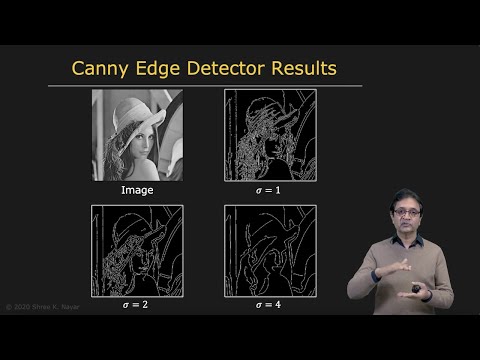
Now, the Canny Edge Detection Algorithm has a few steps that are pretty cool. It starts with **smoothing** an image to get rid of noise. Imagine trying to see something clearly through fog – you wouldn’t want any distractions, right? This is done using a Gaussian filter which blurs the image slightly.
Next up is finding those gradients. This step measures how quickly pixel values change. You can think of it as figuring out where the “bumps” are in your photo. The greater the gradient, the more likely it’s an edge!
Once we’ve found those gradients, we do some **non-maximum suppression** to refine our results. Basically, this means keeping only the strongest edges and getting rid of all that extra fluff. Think of it like trimming off unnecessary fat when cooking – you just want what’s good!
Afterwards, there’s **thresholding** involved where we set two thresholds: one high and one low. Pixels that have gradient values above the high threshold become strong edges while those below the low threshold are discarded as weak edges. Anything between these two gets categorized depending on connectivity to strong edges.
Finally, we wrap things up with **edge tracking by hysteresis** which connects weak edges to strong ones if they’re close enough together. So now you’ve got a clean outline of whatever’s in your image!
Now let’s talk about applications. You might wonder where all this comes handy:
- Robotics: Robots need vision systems for navigation! Edge detection helps them identify obstacles.
- Medical Imaging: In CT scans or MRIs, detecting edges can help doctors pinpoint abnormalities.
- Autonomous Vehicles: Cars use this technique to recognize lanes and obstacles on roads.
- Image Compression: By understanding what parts of an image have high detail (the edges), we can compress files without losing important information.
So yeah, edge detection isn’t just for scientists in lab coats! It’s everywhere around us – from your smartphone camera to advanced AI systems analyzing imagery data. The Canny algorithm stands out because it strikes a balance between accuracy and speed, making it super popular among developers working with images.
In a nutshell, edge detection plays a vital role in extracting meaningful information from images and helps various industries innovate and advance their technologies! Exciting stuff for sure!
Understanding the Canny Edge Detection Algorithm in Image Processing: A Comprehensive Overview
So, let’s chat about the Canny edge detection algorithm. You might not realize it, but it’s like one of the superheroes of image processing. Imagine you’re trying to find the outlines in a picture. The Canny algorithm is just that—it helps in detecting edges, which are basically changes in brightness or color. The cool part? Edges tell us where one object ends and another begins!
The whole process kicks off with some serious noise reduction. Think about how a photo can look grainy sometimes—ugh! Canny uses a method called Gaussian blur to smooth out the image. It’s sort of like putting on sunglasses to see better on a sunny day. By eliminating unnecessary details, the algorithm makes it easier to spot those all-important edges.
Once the image is smoothed out, next up is finding gradients. This might sound fancy, but all it really means is figuring out where those significant changes happen in brightness across pixels. In essence, you want to know which direction has the sharpest change—like when you’re turning your head quickly at a party and suddenly notice someone’s wearing a bright red shirt.
- Sobel operator: This is often used to calculate these gradients. Imagine this operator as an assistant helping Canny find those directions of change.
- Magnitude and direction: After this step, we get two important values: gradient magnitude (how steep the change is) and gradient direction (where that change goes).
Alright, here comes one of the genius parts! Now that we have our gradients sorted out, Canny takes things further with non-maximum suppression. Sounds complicated? Not really! Basically, it means we’re cutting down any weak edges to focus solely on strong ones. Picture trimming hedges—you want them neat and tidy.
The next stage involves something called hysteresis thresholding. Quite a mouthful, huh? But think of it as two layers of filters: high and low thresholds. If an edge pixel has a strong enough response (high threshold), it gets marked as an edge for sure; but if it’s weak (low threshold), well… it needs some friends! If it’s connected to any strong edges nearby, then it can stay too.
- Strong Edge: Definitely part of the final output.
- Weak Edge: Only included if it’s linked to strong ones.
You might be asking yourself—like what’s the point? Well, think about how powerful this is for various applications! Whether it’s facial recognition software or even self-driving cars analyzing their surroundings—Canny edge detection plays a huge role in helping machines see and understand images better.
I remember being completely amazed when I first saw how Canny could turn an ordinary picture into something that highlighted important features beautifully. It was like watching someone strip away all distractions from art until only the crucial strokes remained visible!
The beauty of Canny lies not only in its technical details but also its versatility across different fields—from medical imaging to robotics. So next time you’re browsing through images or using tech with visual components, take a moment to appreciate this fantastic algorithm doing its magic behind-the-scenes!
Okay, so let’s talk about Canny edge detection. You know when you’re scrolling through your phone or maybe even snapping pics? Sometimes an image just jumps out at you because of those sharp lines and details. That crispness? That’s partly due to something like Canny edge detection working behind the scenes. It’s like the magic wand of image processing.
So, here’s the deal: Canny edge detection is a technique used to identify boundaries in images—like figuring out where one thing ends and another begins. Imagine you’re looking at a photo of a cat. The edges of its ears, the outline of its whiskers, and all those little details that make it cute are what the algorithm focuses on. It breaks down an image into detectable edges which helps in understanding what’s going on in that picture.
The process involves several steps, starting with smoothing the image (you don’t want noise messing things up) followed by finding gradients—those changes in intensity that signify an edge—then applying non-maximum suppression to thin out those lines, and finally using hysteresis thresholding to eliminate weak edges. Yeah, it sounds pretty technical! But basically, it’s all about sharpening those features.
I remember once trying to enhance some photos from a family trip to the mountains. I thought they looked decent until I applied Canny edge detection and saw how much detail was hidden! You could practically feel the crags and valleys pop right off the screen; it was like peeling back layers of paint on a canvas.
Now let’s get into why this matters in real-world applications. Think about things like computer vision—self-driving cars rely on detecting edges to understand road signs or obstacles. This helps them navigate safely through traffic, which is kinda mind-blowing when you think about it! And then there’s medical imaging; Canny can help in analyzing CT scans or MRIs by outlining important structures or potential areas of concern without needing someone to manually trace everything.
It seems almost poetic how something so mathematical can lead to such stunning visuals and practical use cases—from art enhancement to safety technology. It kind of makes you appreciate not just images but also how we interpret them through algorithms designed by brilliant minds.
So yeah, next time you’re capturing moments or even just scrolling through your gallery, remember there’s a lot more happening under that polished surface than meets the eye!