So, picture this: You’re trying to teach a computer to recognize your dog’s face. Sounds easy, right? But wait, your dog has that goofy expression when it’s happy, and it literally looks like every other dog out there. In the end, the computer gets confused and thinks it’s just a furry blob!
That’s where artificial neural networks come into play. They’re like little brains inside your computer that help it learn patterns—like how to spot that big-eyed goofball in a sea of hounds.
And guess what? You can build these brainy networks using MATLAB! Seriously, if you’ve got some research in mind or just want to impress folks at your next nerd gathering, this is the way to go.
Don’t worry if it sounds a bit complicated. We’ll break it down together and have some fun along the way! It’s all about getting those digital gears turning without losing our minds in the process—promise!
Free Guide to Building Artificial Neural Networks with MATLAB for Scientific Research
Artificial neural networks, or ANNs, are like mini-brains built into computers. They help us solve complex problems by mimicking how human brains work. So if you’ve ever thought about getting into this fascinating area of science and tech, you’re in for quite a ride!
When it comes to building these networks, one of the most popular tools out there is MATLAB. It’s user-friendly and packed with features that make the whole process smoother. You know, it’s like having a really cool toolbox at your disposal!
First things first, what exactly does an artificial neural network do? Imagine trying to recognize faces in photos or predict weather patterns. ANNs can learn from data, which means they get better at their tasks over time! They process information through interconnected nodes, just like neurons in our brains.
So, let’s break down how you can start building your own ANN with MATLAB:
- Setting Up Your Environment: Make sure you have a copy of MATLAB installed on your machine. You might also want the Neural Network Toolbox for additional features.
- Data Collection: Gather the data you want to train your network on. The more diverse and robust your data is, the better your model will perform!
- Defining the Network: In MATLAB, you can create a simple feedforward network using commands like ‘feedforwardnet’. This defines how many layers and nodes you want.
- Training Your Network: Feed your training data into the network to help it learn. The training phase adjusts the weights of connections between nodes so it can make accurate predictions.
- Testing and Validation: Once trained, test the network with new data to see how well it performs. This step is crucial! You want to ensure it generalizes well beyond just what it learned from training.
- Tweaking Hyperparameters: Adjust parameters like learning rate or number of epochs based on performance results. Sometimes this takes a bit of trial and error!
You know what’s really neat? There are tons of examples online where people share their projects using MATLAB for ANNs—everything from predicting stock prices to diagnosing diseases from medical images.
But remember—building an ANN isn’t just about pushing buttons on a software program; it’s about understanding how these networks learn and grow! Like when I tried teaching my dog new tricks: consistency mattered more than anything else.
With enough practice and experimentation, you’ll find that creating these networks becomes second nature. And who knows? Your work might even contribute something valuable to scientific research! How cool would that be?
Optimizing Neural Network Performance: A Comprehensive MATLAB Code Example for Scientific Applications
Building artificial neural networks with MATLAB is, like, an exciting journey into the world of machine learning. If you’re diving into this realm, you’d want your networks to perform their best, right? So let’s chat about some ways to optimize their performance.
First off, let’s talk about data preprocessing. This is where you clean and prepare your data before feeding it into the neural network. Imagine feeding a toddler spaghetti with just your hands—messy and not very effective! Instead, you want to ensure the data is in tip-top shape. This might mean normalizing your data, handling missing values, or even augmenting your datasets to provide more examples for learning.
Then there’s choosing the right architecture. The number of hidden layers and neurons in each layer plays a huge role in how well your model learns. More layers can capture complex patterns but can also lead to overfitting—like when someone studies too much for a test and forgets everything once it’s over! You want to find that sweet spot.
Next up: activation functions. These are like the decision-makers of your neurons. Common ones include ReLU (Rectified Linear Unit) and sigmoid functions. Each has its pros and cons, so understanding when to use which can give you a performance boost.
Let’s not forget about regularization techniques. These help prevent overfitting by adding a penalty for complexity in the model. Think of it as putting a leash on a dog that just wants to chase every squirrel in sight—you want it focused! Regularization can take forms like L1 or L2 regularization.
Another important aspect is learning rates. This is basically how fast or slow your model learns during training. A learning rate that’s too high might cause the training process to skip around like it’s on a pogo stick—missing out on important insights along the way! On the flip side, one that’s too low could lead to painfully slow results. Finding that balance is key.
In MATLAB specifically, you can easily implement these optimizations using built-in functions. It has tools for creating and training neural networks effortlessly. For example:
“`matlab
net = feedforwardnet(hiddenLayerSize);
net.trainFcn = ‘trainlm’; % Use Levenberg-Marquardt optimization
net.performParam.regularization = 0.01; % Regularization parameter
“`
This snippet shows how straightforward it can be to set up basic architecture while keeping track of critical parameters for optimization.
Also important is cross-validation, which involves splitting your dataset into training and validation sets before testing performance again with unseen data later on. This method ensures that your neural network isn’t just memorizing but actually learning patterns!
Finally, always monitor your model’s performance using metrics like accuracy or loss during training—visualize it if you can! That way, you’ll spot any issues early on rather than discovering them at the end of the process after hours of work!
Optimizing neural networks isn’t just about coding; it’s about understanding how all these components fit together like pieces of a puzzle—each piece crucial for revealing that beautiful picture at the end! So roll up those sleeves because getting this right opens doors to some seriously cool applications in science and beyond!
Mastering MATLAB Neural Networks: A Comprehensive Tutorial for Scientific Applications
Building artificial neural networks with MATLAB can feel a bit like stepping into a whole new world. Seriously! It’s not just about coding; it’s about bringing your ideas to life. So, if you’re diving into this for research or just for fun, let’s break it down together.
First things first, MATLAB is super handy because it gives you tools that make working with neural networks smoother. You don’t have to wrestle much with complex code. Instead, you can focus on what really matters: your data and your model.
Understanding Neural Networks
Neural networks are kind of like how our brains work, right? They consist of layers of interconnected nodes (or neurons) that process information. So, when you feed them data, they learn patterns and relationships in that data over time. Think of it as teaching a child to recognize different animals by showing them pictures over and over.
Now, when you’re using MATLAB, you usually start off by loading or creating your dataset. This could be anything from images to numerical data. Once that’s done, you can set up the architecture of your neural network.
Setting Up Your Network
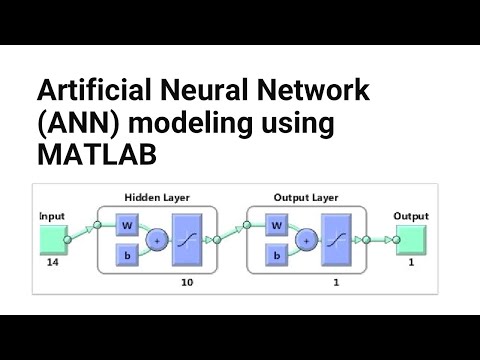
Here’s where the fun part begins! You’ll decide on the number of layers and how many neurons each layer should have. A simple architecture might look something like this:
- Input layer: This is where your data goes in.
- Hidden layers: These do most of the heavy lifting in processing the information.
- Output layer: Here’s where the results come out!
And remember—more neurons doesn’t always mean better results! Sometimes it’s about finding that sweet spot.
Training Your Model
Training is crucial! It’s like teaching a puppy new tricks—you need patience and consistency. In MATLAB, you’ll use functions such as `train()` to adjust weights based on how well your network performs during training.
When training your model:
- You’ll want to split your dataset into training and testing sets.
- The training set helps the model learn, while the testing set checks its performance.
As it learns from each round (called an epoch), you’ll see improvements in accuracy—hopefully!
Tweaking Parameters
Don’t forget—you can adjust various parameters to help refine performance:
- Learning Rate: This controls how big the adjustments are during training.
- Epochs: This is how many times your model sees the entire dataset.
- Batches: Sometimes it helps to feed data in smaller chunks instead of all at once.
Experimenting here can lead to better accuracy and faster learning times.
Evolving Your Output
Once trained, it’s time for testing! You want to check if it predicts accurately using unseen data—that’s where its real power lies! You’d analyze results by comparing predicted outcomes against true values through metrics like Mean Squared Error or accuracy percentages.
Finally, don’t forget about visualization! MATLAB has amazing plotting functions that let you visualize how well your network fits the data or see changes in error rates over time.
So yeah, mastering neural networks in MATLAB takes time and playfulness but totally pays off in research projects or even just personal experiments. Whether you’re trying to figure out weather patterns or analyzing medical images—it opens doors to fascinating discoveries! Just remember—like any skill worth having—it takes practice. Happy coding!
You know, when it comes to creating artificial neural networks, it feels a bit like trying to teach a child how to think. It’s not just about throwing some numbers at a computer and hoping it gets smarter. There’s this whole process involved, like guiding it through a maze until it figures out how to find the cheese—so to speak.
Anyway, I remember back in college, we had this group project where we had to build a basic neural network using MATLAB. At first, I was totally lost. I mean, programming isn’t exactly my strong suit. But as we dove into the project together, something clicked for me. The way MATLAB handles matrices and calculations made things easier once you got the hang of it. It’s like having a set of building blocks that fit together nicely.
What struck me the most was how these networks learn over time, you know? We started with random weights and biases that dictated how inputs were processed. Then, after feeding data through multiple layers and tweaking parameters like activation functions and learning rates; we witnessed our little network transform right before our eyes! Each iteration brought us closer to a model that could predict outcomes based on input data—a bit like how your brain adapts and wires itself with experiences.
Of course, there were bumps along the way: unexpected errors or results that didn’t make sense at all. But that’s part of research too! Like when you’re digging into something new; sometimes you hit dead ends or realize you’ve been asking the wrong questions altogether.
So yeah, building artificial neural networks with MATLAB isn’t just about crunching numbers and algorithms. It’s more personal than that; it’s almost an art form where you nurture this digital brain into existence. And when you see it actually working—like recognizing patterns or making predictions based on experience—you can’t help but feel excited about what’s possible in AI research!