Okay, so picture this: you’re at a party and someone casually mentions how they can predict if someone will show up to their next get-together based on their last five reactions to invites. It’s like magic, right? But what if I told you there’s some serious science behind that?
Let me introduce you to binary logistic regression! Yeah, it sounds all fancy and technical, but hold that thought. It’s just a way to analyze data when you have a yes or no question. Like whether or not your friend will come over for pizza.
Now, imagine you’re diving into research and want to find out some juicy details about your survey results. You might ask questions like: “What makes people say yes?” or “Why do they ghost my party invites?” This is where SPSS comes in—your trusty sidekick for crunching numbers without pulling your hair out.
Don’t sweat it if you’re new to this whole thing. We’ll break it down together, step by step. Grab your favorite snack, and let’s unravel the mysteries of binary logistic regression with SPSS. Seriously, it’ll be fun!
Mastering Binary Logistic Regression in SPSS: A Comprehensive Guide for Scientists
Binary logistic regression sounds like a mouthful, huh? But it’s really just a way to understand how certain factors affect the likelihood of something happening or not. Like, let’s say you’re studying whether students pass their exams. You’d use binary logistic regression to see what impacts that pass/fail outcome based on various factors, like study hours or attendance.
So, when you’re using SPSS for this kind of analysis, here’s the scoop on how to get it done right:
Understanding Your Variables
First off, you need a dependent variable that’s binary. This means it can only have two outcomes—like pass/fail, yes/no, or alive/dead. Your independent variables can be anything from age to hours studied or even gender.
Setting Up Your Data
In SPSS, you start by entering your data. It should be neatly organized in columns. Each row corresponds to an individual case. So if you’ve got 100 students, that means 100 rows of data.
Running the Analysis
Once everything looks good in your dataset:
- Go to **Analyze**
- Select **Regression**
- Choose **Binary Logistic…**
Now this is where the magic happens! You’ll see a window pop up letting you assign your dependent variable and independent variables. Just drag those babies into the right boxes.
Interpreting the Output
After hitting “OK”, SPSS will give you a bunch of outputs—like an overload of numbers! But don’t sweat it. What you’re looking for are a few key things:
- The Coefficients table: This tells you the relationship between each variable and your outcome—the bigger the number (positive or negative), the stronger the influence.
- The wald statistic: This helps show if those coefficients are statistically significant.
- The Pseudo R² values: They help explain how well your model fits your data.
Oh! And remember that positive coefficient means more likelihood of your dependent event happening. A negative coefficient means less likelihood.
Evaluating Model Fit
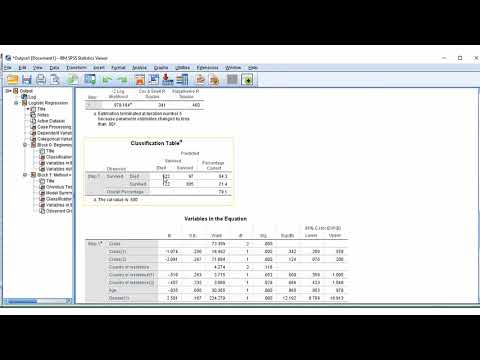
One neat trick is to look at classification tables in SPSS output which show how well your model predicted actual outcomes versus expected ones. You want high percentages in correctly predicted cases!
Now let’s talk about overfitting—that’s when your model explains everything too perfectly but doesn’t work well with new data. So keep an eye on that!
And speaking of watching out—make sure there’s no multicollinearity among predictors (that’s when independent variables are too closely related). If they are, it messes with results big time!
Finally, don’t forget about assumptions! Like with many stats methods, check if your data fits logistic regression assumptions; things like independence of observations matter.
So there you go! Mastering binary logistic regression in SPSS might seem daunting at first but break it down step by step and keep at it—you’ll find yourself navigating through research questions like a pro before long!
Comprehensive Guide to Interpreting Binary Logistic Regression Outputs in SPSS: A Scientific Approach
Binary logistic regression can seem a bit overwhelming at first, but once you get the hang of it, it’s really just a powerful way to understand relationships between variables. So, what’s the deal? Basically, it helps you predict a binary outcome—like yes or no, success or failure—based on one or more predictor variables.
First off, let’s kick things off with what those **outputs** look like in SPSS. You’ll see a bunch of tables after running your regression analysis. Don’t worry; I’ll break them down for you.
1. Variables in the Equation: This is where the magic happens! You’ll find information about how each predictor variable is impacting your odds of an outcome.
– Look for coefficients. These numbers tell you about the strength and direction of your predictors. A positive coefficient means that as your predictor increases, the likelihood of the outcome happening also increases.
– The wald statistic helps show whether your predictors are statistically significant. If it’s significant (often p < .05), it means there’s a notable association with your outcome.
2. Model Summary: Here you’ll see goodness-of-fit statistics that help assess how well your model is performing.
– The **-2 Log Likelihood** value shows how well the model fits compared to a baseline model (without predictors). A smaller value here suggests better fit.
– Look at R² values, like Cox & Snell and Nagelkerke R². These values give insights into how much variation in the dependent variable is explained by the model. They range from 0 to 1—you want them to be higher!
3. Classification Table: This section summarizes how well your model correctly predicts outcomes.
– The percentages for “correctly classified” cases tell you about its predictive power. If you’re predicting whether patients will experience recovery and 85% were correct, that’s pretty solid evidence!
Now let’s talk about interpreting those coefficients—a crucial piece! Each coefficient can be transformed into an odds ratio by exponentiating it (which is just fancy math speak for raising e to that coefficient’s power).
Odds Ratios (OR):
– If OR > 1, increasing that predictor is associated with higher odds of your outcome.
– If OR < 1, it’s associated with lower odds—for instance, if smoking has an OR of 0.5 regarding lung cancer diagnosis, individuals who smoke have lower odds than non-smokers due to some other controlling factor being considered.
It feels good to wrap your head around this stuff! I remember when I first tackled logistic regression; my brain felt like it was on fire! But understanding each part can really empower you in research—like when my friend used this method to predict student success rates based on studying habits and other factors; he ended up helping many students improve their grades!
Lastly, don’t forget about checking assumptions before diving into analysis! Look out for multicollinearity among predictors—you don’t want them being too similar because they could mess with your results.
So there ya have it! Binary logistic regression isn’t as scary as it seems once you know what you’re looking for in SPSS output tables. It opens up a world of understanding relationships between variables in research—who doesn’t want that?
Utilizing Binary Logistic Regression in SPSS to Address Research Questions in Scientific Inquiry
When jumping into the world of statistics, binary logistic regression is a powerful tool. It helps us make sense of research questions, especially when the outcome we’re interested in is categorical—like yes or no, success or fail, you know?
Using SPSS, which stands for Statistical Package for the Social Sciences (but don’t let that name fool you; it’s used widely across multiple fields), makes applying binary logistic regression a bit more accessible. So, let’s break this down into manageable bits.
Understanding Binary Logistic Regression is crucial. Instead of predicting a continuous outcome (like height or weight), what you’re doing here is predicting which category an observation belongs to. For instance, say you want to predict whether students pass or fail based on their study habits and attendance. Your outcome variable is binary: pass (1) or fail (0).
Now, getting started in SPSS with binary logistic regression usually involves some steps:
- Data Preparation: Make sure your data is clean. This means checking for missing values and ensuring your categorical variables are properly defined. Each category should be coded correctly—like using 0 for “no” and 1 for “yes.”
- Selecting your variables: You’ll need both your dependent variable (the outcome) and independent variables (predictors). In our student example, passing/failing would be dependent while study habits could be independent.
- Running the Analysis: In SPSS, you’ll head over to the Analyze menu and find Regression, then Binary Logistic. From there, it’s just about setting up your model—putting in your dependent variable first and then adding your independents.
- Interpreting Output: After running the analysis, you’ll get tables with coefficients that tell you how much each predictor affects the odds of passing versus failing. A positive coefficient means an increase in chances; a negative one signifies a decrease.
Once you’ve got those results, interpreting them isn’t just staring at numbers—it’s understanding what they actually mean in real life! For example, if study hours have a coefficient of 0.5, it indicates that more study hours increase the likelihood of passing.
Anecdote time: I remember working on a project where we used similar methods to see how health-related factors impacted recovery rates from surgery. It was eye-opening! Some factors were totally predictable while others surprised us completely— like how having supportive friends made a bigger difference than we expected.
So basically, binary logistic regression in SPSS allows researchers to explore questions where outcomes aren’t just black-and-white but involve categories that can deeply influence decisions and actions based on data.
In summary, employing this method can elevate scientific inquiry by providing clarity on relationships between variables when they matter most! Whether you’re looking at educational outcomes or healthcare assessments—or anything really—you’ll find that understanding these statistical tools lets you make informed choices based on solid evidence rather than just gut feelings!
So, let’s chat about binary logistic regression and how it works in SPSS for research purposes. Okay, first off, binary logistic regression is a statistical method that helps you understand the relationship between a dependent variable that has two outcomes (like yes/no or success/failure) and one or more independent variables. Sounds a bit technical, huh? But stick with me!
I remember when I first stumbled upon this method during my time at university. I had a group project where we were trying to figure out what factors influenced whether students passed or failed a particular course. We had all these variables—study hours, attendance rate, even coffee consumption! Anyway, we used SPSS to run our analysis, and let me tell you, seeing those results pop up on the screen was both thrilling and terrifying.
Basically, the idea behind using binary logistic regression is to estimate the probability of a particular outcome happening based on your input variables. It’s like saying, “Hey! If I know how many hours someone studied and how often they attended classes, what are the chances they’ll pass?”
When you’re working with SPSS, which is like this powerful buddy in your corner for statistical analysis, applying binary logistic regression feels pretty straightforward. You just need to select your variables and press some buttons—voila! But then comes the part where you have to interpret what all those numbers really mean. That can be the tricky part.
For instance, when you look at odds ratios that come from your analysis—these little gems show how much the odds of passing (or whatever outcome you’re studying) increase or decrease with each unit change in your independent variable. It can get mind-boggling! Sometimes I wish there was an easy button for understanding statistics.
And while you’re crunching these numbers in SPSS and getting those results back, don’t forget about being thoughtful about assumptions and limitations in your study. Like any tool, logistic regression has its quirks—it assumes that there’s no multi-collinearity among predictors (that means your independent variables shouldn’t be too closely related) which can throw off your results if you’re not careful.
Honestly? Researching using binary logistic regression can feel like being on this roller coaster ride where you’re super excited but also kinda anxious about twists and turns along the way. You might uncover some fascinating insights about relationships between factors in your study while also grappling with unexpected results that don’t line up with what you thought would happen.
In short: Sure, applying binary logistic regression using SPSS isn’t always smooth sailing—but when it clicks? Oh man! There’s something incredibly rewarding about unveiling patterns and trends from data that you never saw coming. So yeah… it’s definitely worth diving into if you’re looking to add depth to your research!