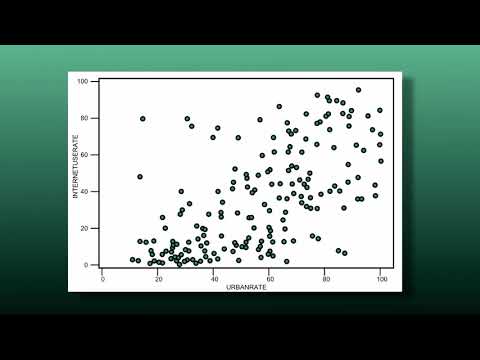
You know that feeling when you find two things that totally connect, like peanut butter and jelly? Correlation is a bit like that! It’s all about spotting those relationships between different sets of data.
Picture this: You’re looking at weather data and ice cream sales. One day, you notice sales spike on sunny days. Well, that’s correlation in action! It’s super useful for research, helping us understand how stuff interacts.
Now, when it comes to Python, it’s like having a magic wand for numbers. Seriously, you can crunch tons of data faster than your brain can keep up. It’s perfect for digging into all those fascinating questions in the scientific world.
We’ll chat about techniques that let you explore these connections easily. So grab a snack (maybe some ice cream?) and let’s get into the cool stuff Python can do for correlation in science!
Choosing the Right Correlation Coefficient: A Guide to Pearson, Spearman, and Kendall in Scientific Research
When you’re diving into the world of correlation coefficients, it’s like choosing the right tool for a job. You’ve got Pearson, Spearman, and Kendall ready in your toolbox, each with its own vibe. Let’s break ‘em down.
Pearson correlation coefficient is your classic go-to. It measures the strength and direction of a linear relationship between two variables. You know, like when you’re checking how height relates to weight in a bunch of kids playing football. So, if you plot their height against their weight and it looks like a straight line going up, that’s where Pearson shines! Just remember: it only works well if the data is normally distributed.
Then we have Spearman’s rank correlation coefficient. This one is a bit more flexible. It doesn’t need your data to follow that strict linear pattern. Instead, it ranks the data points and looks at how those ranks correlate. Like imagine you have scores from different students who took an exam—if they all sort of did better or worse together (even if not perfectly), Spearman can pick that up! It’s super handy for ordinal data too, which basically means things you can put in order but might not measure precisely.
Now let’s chat about Kendall’s tau. This one’s often considered a bit nerdy but in a good way! It measures the strength of association between two variables by comparing how many pairs are in agreement versus disagreement. It’s like counting all your friends who agree on where to eat vs. those who don’t—simple yet effective! Kendall tends to be more robust with smaller datasets or those with lots of ties (you know, when two values are identical).
So when picking one for your research in Python:
- If you’re dealing with continuous variables and normality isn’t an issue? Go for Pearson.
- If your data isn’t normal or you’re using ranks or ordinal scales? Hello Spearman!
- Got small sample sizes or need something extra robust with ties? Make Kendall your buddy.
The beauty is that all three give you insight into relationships between variables without making things overly complicated. Just remember to think about the nature of your data first!
Understanding Correlation in Scientific Research: Key Concepts and Applications in Science
Alright, let’s talk about correlation. You know, it’s one of those fancy-sounding terms that scientists throw around, and it actually just means a relationship between two things. In scientific research, understanding correlation is crucial because it helps us figure out how different variables are connected. So, like, when you see a study that says there’s a correlation between ice cream sales and drowning incidents, it’s easy to jump to the wrong conclusion. They don’t cause each other; it’s just that both go up in summer!
Correlation measures the strength and direction of a relationship between two variables. Think of it like a dance: sometimes they move together, sometimes they don’t. The most common way to measure this is through the correlation coefficient, which ranges from -1 to 1:
- 1: Perfect positive correlation (as one goes up, so does the other).
- -1: Perfect negative correlation (when one goes up, the other goes down).
- 0: No correlation at all.
If you’re into coding and data analysis—like many scientists today—you might find yourself using Python for this stuff. Python has some super handy libraries like Pandas and Numpy, which can make calculating correlations pretty straightforward.
Using these libraries lets you load your data easily and apply functions to compute correlations quickly without getting your hands too dirty with math. For instance, if you have two lists of numbers representing temperature readings and ice cream sales over time, you can use Python’s built-in functions to crunch those numbers for you.
A cool thing about correlation is that it comes in different flavors:
- Pearson’s correlation: Measures linear relationships between variables.
- Spearman’s rank correlation: Good for non-parametric data or when data isn’t normally distributed.
- Kendall’s tau: A bit more robust with smaller datasets or tied ranks.
The choice between these really depends on what you’re working with. Like if your data has some weird distribution patterns or outliers—go for Spearman! It’s more forgiving.
You might also hear about something called “confounding variables“. That’s just fancy talk for factors that could muddy the waters in your analysis. Imagine you’re looking at how plant growth relates to sunlight exposure but forget about watering levels; well, then your conclusions could be way off base!
You see why understanding this stuff is essential? As researchers dive into their projects—whether studying climate change effects on agriculture or exploring links between diet and health—they need solid grounding in these concepts so they’re not chasing shadows.
Your emotional findings may turn out groundbreaking; you’d hate for flimsy correlations to steer you wrong! Remember when I mentioned ice cream and drownings? Seems silly until someone makes policy decisions about public safety based on misinterpreted data!
Catching correlations doesn’t mean we’ve found causes but rather paths worth exploring further—you know what I mean? So next time you hear some scientist rave about correlation coefficients or charts showing trends, you’ll have a better idea of what’s behind those numbers!
Exploring Python Libraries for Correlation Coefficient Calculation in Scientific Research
Alright, let’s talk about correlation coefficients and how you can calculate them using Python libraries in scientific research. Correlation coefficients are basically numbers that describe the degree to which two variables are related. If you’re diving into data analysis, you’ll find this super useful!
Now, when it comes to computing these coefficients in Python, there are a few libraries that really stand out. Here’s a quick overview:
- Pandas: This library is like your best friend for data manipulation and analysis. With its built-in functions, you can easily calculate correlation coefficients.
- NumPy: Good ol’ NumPy! It’s fantastic for numerical operations and can help you find the Pearson correlation coefficient.
- Scipy: This library is where the magic happens for statistical tests! You can use it to compute various types of correlation coefficients — not just Pearson, but also Spearman and Kendall.
Let’s dig a bit deeper into how these libraries can be used.
Pandas provides a simple method called .corr(). Imagine you have a DataFrame with different columns representing variables — say height and weight. You’d just call df.corr(), and voilà! You get the correlation matrix, showing how closely related each pair of variables is.
On the other hand, if you’re using NumPy, calculating the Pearson correlation coefficient is straightforward too. Just pass your two data arrays into the function like this: numpy.corrcoef(x, y). It returns a matrix from which you can grab your desired value.
Then there’s Scipy. It’s got this handy function called scipy.stats.pearsonr(x, y). It doesn’t just give you the coefficient; it also gives you a p-value which tells you how statistically significant that correlation is!
I remember when I first played around with these libraries while analyzing some research data on plant growth under different light conditions. I had gathered all my measurements in an Excel file, but then I realized Python could make life so much easier! Using Pandas to import my data and compute correlations saved me so much time — I couldn’t believe how quick it was!
The cool thing about these libraries is their versatility. Each has its strengths: Pandas shines in handling datasets; NumPy excels at handling numerical arrays; and Scipy bridges everything together with its robust statistical capabilities.
You might also want to look at visualization after calculating your correlations—seeing those relationships visually can be super insightful! Libraries like Matplotlib or Seaborn work great for plotting scatter plots or heatmaps that showcase those correlations beautifully.
The point is, whether you’re analyzing climate data or social behaviors in animals, knowing how to use these Python libraries makes your work way easier and often more enjoyable too! So go ahead and give them a try!
So, let’s chat about correlation techniques in Python and how they can totally make a difference in scientific research. You know, back in college, I was knee-deep in an ecology project that involved studying the impact of various factors on plant growth. I remember spending late nights trying to figure out if temperature really affected how tall my plants grew. That’s when I stumbled upon correlation analysis and Python. Man, what a game changer!
Basically, correlation tells you if two variables are related somehow. Like, if one goes up, does the other follow? In my case, it was like figuring out if the rising heat was making my plants stretch for the sun, or just chilling out without care. And Python? Well, it has these amazing libraries—like Pandas and NumPy—that make it super easy to handle data.
When you’re looking at your data set—whether it’s plant heights or even something more complex like medical records—you can throw all those numbers into Python and quickly see how things line up with each other. The code is pretty straightforward too! It’s like writing a recipe where you’ve got your ingredients (data) and you just need to mix ‘em right.
You can use methods like Pearson’s correlation for linear relationships or Spearman’s for ranks when your data isn’t that tidy. It’s empowering! You get these clear visualizations too. Imagine plotting a scatter plot where each dot tells a little story about your findings.
But of course, there’s a catch—correlation doesn’t imply causation. Just because two things seem linked doesn’t mean one is causing the other. That’s where you gotta be careful; think critically about what your results mean!
Reflecting on my plant project now feels kind of nostalgic because it reminds me of how much this whole process helped me grow as a student and researcher (pun intended!). The thrill of analyzing data and finding connections is something that sticks with you.
So whether you’re measuring climate change effects or analyzing gene expressions in labs, using Python for correlation techniques opens up so many doors for understanding patterns in research—and honestly? That feeling of discovery is worth every line of code you write!