You know that feeling when you’re at a party, and someone asks you to tell a joke? You want it to land, but you have no idea if it’ll get a laugh or just crickets. That’s kind of what normality testing in R feels like!
So, you’ve got your data and you’re hoping it’s all nice and normal. But how do you really know? Well, that’s where normality tests come into play. They help you figure out if your data is good to go or if it’s more of an oddball.
Imagine being a scientist trying to prove a point, but your data decides to act all quirky. It’s like trying to bake a cake without checking if the eggs are fresh first—it could end in disaster! And nobody wants that when you’re publishing your research.
Let’s chat about why we need these tests, how they work in R, and what they can do for your scientific journey. Trust me; once you get the hang of it, you’ll be breezing through those analyses with confidence.
Applying Normality Testing in R: A Comprehensive Guide for Scientific Research
Normality testing is a big deal in statistics, especially when you’re dealing with data for scientific research. Basically, if you want to use certain tests, like t-tests or ANOVA, your data needs to be normally distributed. So, how do you check for that? You can use R—a super handy programming language for statistical analysis!
First off, there are several ways to test for normality in R. You might have heard of some famous tests like the Shapiro-Wilk test or the Kolmogorov-Smirnov test. These tests give you a statistical way to check if your data deviates from a normal distribution.
Let’s break this down a bit more:
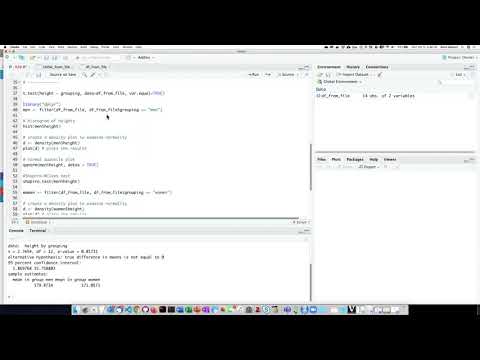
1. Shapiro-Wilk Test: This is one of the most common tests. It checks whether your data follows a normal distribution. To perform this test in R, you can simply use the `shapiro.test()` function. <- c(2.3, 2.8, 3.4, 4.1, 4.7)
shapiro.test(data)
“`
If the p-value from your test is less than 0.05, it suggests that your data isn’t normally distributed.
2. Kolmogorov-Smirnov Test: This one compares your sample with a reference probability distribution (like the normal distribution). The function `ks.test()` does just that!
“`R
ks.test(data, “pnorm”, mean=mean(data), sd=sd(data))
“`
Again, watch for those p-values!
3. Q-Q Plots: Besides those formal tests, visual methods are super useful too! A Quantile-Quantile (Q-Q) plot lets you see how well your data fits a normal distribution visually.
“`R
qqnorm(data)
qqline(data)
“`
If points fall roughly along that straight line, you’re probably good to go with assuming normality!
Now here’s where it gets really interesting: sometimes your data isn’t normally distributed at all! Maybe it’s skewed or has outliers—this happens quite often in real-world scenarios! If that’s the case, you might want to explore transformations such as logarithmic or square root transformations to help normalize it.
4. Transformations: R has some functions that make these transformations easy-peasy! Here’s how to log-transform:
“`R
log_data <- log(data)
shapiro.test(log_data)
“`
Just keep in mind: not all transformations will work perfectly every time.
Alrighty then! Once you’ve tested and analyzed whether your data fits the bell curve model of normality—or if you’ve transformed it—what’s next? You’ll move on to whatever statistical analyses suit your research needs.
The process of checking for normality is kind of like checking ingredients before cooking; it’s essential before diving into more complex analyses! Always remember: knowing whether your assumptions hold true is crucial for getting reliable results!
So yeah, applying normality testing in R may seem like another task on your plate at first glance but once you get used to it, it’ll feel like a breeze! Keep playing around with those functions and plots until you’re comfortable with them and soon they’ll become second nature in your scientific toolbox.
Understanding the Kolmogorov-Smirnov Test for Normality in R: A Comprehensive Guide for Statistical Analysis
Alright! So, let’s talk about the **Kolmogorov-Smirnov test** and how you can use it for checking normality in R. The thing is, normality testing is super important when you’re doing statistical analyses because many techniques assume that your data follows a normal distribution.
First off, the Kolmogorov-Smirnov (K-S) test compares your sample with a reference probability distribution. In this case, we’re usually looking at the normal distribution. Basically, it measures how far your data points deviate from what you’d expect if they were perfectly normal.
Now, you might be wondering how to actually run this test in R. It’s pretty easy! Here’s a quick rundown:
- Install and load necessary packages: You’ll want to make sure your R environment has the required packages. If you’re looking to visualize your results, think about installing `ggplot2` too.
- The function: The main function you’ll use is `ks.test()`. You basically need to provide it two arguments: your data and the expected distribution.
- Example: Say you’ve got some data saved in a variable called `my_data`, you’d run something like this:
ks.test(my_data, "pnorm", mean(my_data), sd(my_data))
So what exactly does that code do? Well, `pnorm` is a function that gives the cumulative distribution function of a normal distribution. By including `mean(my_data)` and `sd(my_data)`, you’re telling R to consider the mean and standard deviation of your sample when comparing it to the theoretical normal curve.
Now here’s where it gets a bit tricky: interpreting results. When you run this test, R gives you a D statistic and a p-value. The D statistic tells us how far away our sample’s cumulative distribution function diverges from the theoretical one. A small p-value (typically less than 0.05) suggests that there’s enough evidence to say our data doesn’t follow a normal distribution.
But hey, don’t rush into conclusions! You should perform additional tests or graphical evaluations too—like Q-Q plots or histograms—to get more insight into your data’s behavior.
A personal note here: I once had trouble with my thesis’ statistics until I stumbled upon K-S testing. It was such relief when I finally figured out my dataset wasn’t as perfectly normal as I thought! It really helped me adjust my approach going forward.
Oh, one last thing—be cautious about using K-S for small sample sizes since its power to detect deviations decreases under those conditions.
So yeah, that’s pretty much all there is for understanding the Kolmogorov-Smirnov test in R for checking normality! Keep practicing those R skills; it’ll pay off in spades during all of your future analyses!
Mastering the Shapiro-Wilk Test in R: A Comprehensive Guide for Statistical Analysis in Scientific Research
The Shapiro-Wilk test is a statistical procedure used to check if your data follows a normal distribution. This is really important, especially when you’re working on scientific research. Normality often underpins many statistical tests. If your data is normal, you can choose from a whole range of parametric tests that give you more power and reliability.
To run the Shapiro-Wilk test in R, all you have to do is use the `shapiro.test()` function. It’s pretty straightforward. You throw your data into it, and voilà! You get back a W statistic and a p-value. If your p-value is less than 0.05, it usually means your data isn’t normally distributed. <- c(2.3, 2.5, 2.1, 3.0, 2.8)
# Conducting the Shapiro-Wilk test
result <- shapiro.test(data)
print(result)
“`
This snippet creates an array of numbers and runs the test on them.
So what does all this mean? The W statistic tells you how far your sample distribution deviates from a normal distribution: the closer to 1, the better! The p-value helps you decide whether to accept or reject the null hypothesis (which states that your data is normally distributed).
Now here’s an interesting little story for you: I once worked with a researcher who had collected air quality data over several months. They assumed their readings followed normality because they looked evenly distributed on their graphs—but when we ran the Shapiro-Wilk test… surprise! The p-value was less than 0.01! Turns out air quality readings can be pretty skewed due to things like weather patterns and traffic spikes.
If you’re dealing with larger datasets or complex distributions, sometimes things get tricky—if your sample size is huge (like thousands of records), even tiny deviations from normality can lead to significant p-values that might mislead you into thinking there’s a problem when there isn’t one.
To summarize, here are key points about using the Shapiro-Wilk test in R:
- Simple syntax. Use `shapiro.test(your_data)` for quick testing.
- P-Value interpretation. A p-value below 0.05 suggests non-normality.
- W Statistic value. A value closer to 1 indicates more similarity to normal distribution.
- Be mindful of sample size. Large samples can show significant deviations that aren’t practically important.
- Visual checks too! Consider using histograms or Q-Q plots for additional insights into your data’s distribution.
In conclusion; while mastering this test means getting comfortable with some statistics lingo, it’s totally doable! Running the Shapiro-Wilk test and interpreting its results gives you crucial information about how best to analyze your dataset in research scenarios—keeping science both accurate and reliable!
So, let’s chat about normality testing in R. It might sound super technical, but really, it’s just one of those things that can make or break your research. I remember back in college, my buddy Mark was totally stressed out over his final project. He had collected a ton of data on plant growth and was convinced that he’d nailed it. But then he found out he needed to test if his data followed a normal distribution before running some fancy analyses. Talk about a panic moment!
Normality testing is all about figuring out if your dataset behaves like a perfect bell-shaped curve (you know, the classic Gaussian distribution). This is important because many statistical tests assume that the data you’re working with fits this neat little model. If it doesn’t, well, the results you get could be off—like way off.
When using R for this kind of stuff, you’ve got some cool tools at your fingertips. There are several tests you can run, like the Shapiro-Wilk test or the Kolmogorov-Smirnov test. They’re not hard to use at all! You just plug in your data and see what happens. But here’s the kicker—you gotta understand what the results mean.
Say you find out your data isn’t normal after all; that’s where things get interesting! You might need to switch gears and either transform your data (like using logarithmic transformations) or choose non-parametric tests which don’t require those assumptions about normality.
And honestly, trying out these tests in R can feel a bit like an art form sometimes. It can be frustrating when you’re trying to figure everything out on your own; R has this learning curve that can make you want to pull your hair out. But once you get comfortable? It’s like having a whole lab right at your fingertips!
So yeah, whether you’re doing ecological studies like my friend Mark or diving into social sciences, understanding how to test for normality in R can really help sharpen our analytical skills and lead us right towards answers we’re looking for—or at least help us ask better questions next time around.
At the end of the day, it’s all about making sure our science is as solid as possible! That’s what gets me excited—knowing that being meticulous now will lead to better insights later on. How cool is that?