You know when you’re trying to take the perfect photo, and it just ends up looking all blurry or weird? Yeah, that’s the struggle of light and shadow working against you. But there’s this cool little trick called the Otsu Algorithm that’s like having a secret weapon in your pocket for image processing.
So, picture this: You snap a shot of your pet doing something adorable. You want to make sure everyone sees just how cute they are, but the lighting is doing you dirty. This is where Otsu comes in to save the day! It helps figure out how to separate light from dark in an image, making everything pop.
In a world overflowing with images—like social media posts or endless memes—making sense of all that data can feel overwhelming. But thanks to this nifty algorithm, we can clarify those images without breaking a sweat! Let’s dive into why Otsu is such a game changer for anyone who loves visuals.
Exploring the Otsu Algorithm: Enhancements and Applications in Image Processing within Scientific Research
The Otsu Algorithm is like a superstar in the world of image processing. You know how sometimes you take a picture, and the light just isn’t right? The Otsu Algorithm can help with that, especially when you’re trying to make sense of images in scientific research.
Basically, this algorithm helps separate an image into different parts based on color or intensity. Imagine it as a smart tool that figures out the best way to divide an image into foreground and background. Pretty cool, right?
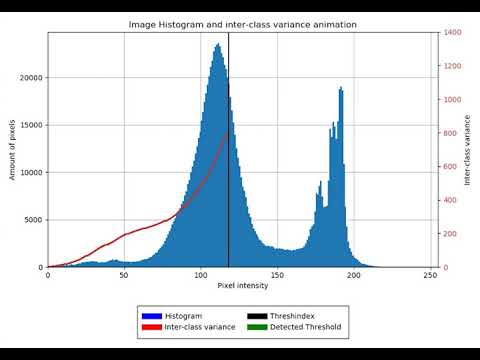
So here’s the deal: the Otsu method looks at the grayscale of an image and calculates a threshold value. This threshold helps distinguish between classes—like what’s dark and what’s light in your picture. The goal is to minimize intra-class variance while maximizing inter-class variance. I know, it sounds a bit technical! What it means is that it tries to create two groups that are as distinct as possible from each other.
You might be thinking, why should we care? Well, there are plenty of applications where clear imaging is crucial. Here are some examples:
- Medical Imaging: In medical fields, this algorithm can help detect tumors or other irregularities by enhancing important features in an image.
- Astronomy: Scientists often analyze celestial bodies’ images using Otsu to differentiate stars from surrounding space.
- Biological Research: When looking at microscopic images of cells or tissues, clear differentiation of structures can be vital for understanding diseases.
Now, let’s talk about enhancements. Although the basic Otsu Algorithm does its job well, there are some tweaks researchers have added over time. For instance:
- Multi-level Thresholding: Instead of just dividing into two parts (foreground and background), enhanced versions can handle multiple thresholds for more complex images.
- Adaptive Methods: In certain cases where lighting isn’t uniform across an image, adaptive approaches adjust thresholds based on local information rather than a global calculation.
I mean, seriously! Think about how much clearer a scanned document can look when you enhance its contrast using these methods.
A fun anecdote here: I once tried using the Otsu method on an old family photo that got faded over time. It was amazing how much detail popped out after applying this technique! Faces became recognizable again—like a time capsule opening up!
To wrap it up: The Otsu Algorithm isn’t just some geeky math trick; it plays a crucial role in various scientific fields by making unclear images clear-cut and easy to analyze. With advancements and enhancements continually being developed, who knows what new applications might emerge next? Isn’t science just awesome?
Otsu Algorithm: Enhancing Image Processing Techniques in Scientific Applications – A GeeksforGeeks Overview
So, let’s talk about the Otsu Algorithm. This little gem is a method used in image processing, specifically designed for binarization, which means separating an image into two parts: foreground and background. Imagine you’ve got a picture of a cat chilling in the dark with some bright sunlight streaming in. You basically want to tell your computer, “Hey! Show me just the cat!” That’s where Otsu comes in.
The cool thing about this algorithm is that it automatically figures out the best threshold for separating those two parts, without needing you to guess or fiddle around with numbers. It analyzes all pixel values and finds a threshold that minimizes the intra-class variance while maximizing the inter-class variance. Sounds fancy, but it’s really about finding that sweet spot where your foreground pops against its background.
Here’s how it works, in simple terms:
- Thresholding: The algorithm explores all possible thresholds between 0 and 255 (in an 8-bit grayscale image) and computes two types of variances for each threshold: within-class variance and between-class variance.
- Finding the Best Threshold: By comparing these variances, it selects the threshold that gives you the best separation between classes. You know, like choosing just the right filter on Instagram to make your selfies look fab!
- User-Friendly: No need for prior knowledge about illumination or color histograms; Otsu does all heavy lifting by itself!
This method really shines when dealing with images that have different lighting conditions. For instance, let’s say you took a photo of a leaf on a sunny day with shadows creeping in from behind. Otsu can help isolate that leaf even when parts of it are overshadowed by light or shadow.
I remember one time I was working on a project involving medical imaging. We had scans where tumors were sometimes quite hard to distinguish due to similar pixel intensities around them. Using Otsu’s method made those tumors pop! It helped my team spot things we might have missed otherwise because we weren’t stuck sifting through tons of data manually.
If you’re into coding, implementing Otsu is not rocket science either! Libraries like OpenCV have built-in functions just waiting for someone like you to call them up and get going. You could whip up some crazy cool image-processing project faster than you can say “threshold.”
The bottom line? The Otsu Algorithm helps improve image processing techniques by making things simpler for everyone involved—scientists or hobbyists alike can really benefit from its use in various fields including health diagnostics and even AI applications!
Comprehensive Guide to Otsu Thresholding Algorithm Steps in Image Processing
Otsu thresholding is a super neat technique in image processing that helps you separate an image into different parts based on their intensity levels. Basically, it’s like finding a clear boundary between dark and light areas in a picture, which can be super useful for all sorts of applications, from medical imaging to computer vision.
The way it works is pretty cool and involves looking at the histogram of the image—that’s just a fancy word for a graph showing how many pixels fall under each intensity level. Here’s how the Otsu method rolls:
- Calculate Histogram: First things first, you want to create a histogram of the pixel intensities in your image. This gives you a visual representation of how many pixels correspond to each intensity level from 0 (black) to 255 (white).
- Compute Probabilities: Then, you’ll calculate the probability of each intensity level occurring. Think of this as counting how common each shade is in your picture.
- Class Means: You distinguish between two classes: background (let’s say lower intensities) and foreground (higher intensities). For each possible threshold value, you’ll compute the mean intensity for both classes.
- Total Mean Intensity: To evaluate how well you’re separating these classes, find the overall mean intensity of all pixels in your image. This serves as a baseline.
- Between-Class Variance: The next big step is calculating something called the “between-class variance” for every possible threshold value. This number essentially tells you how spread out your classes are around their means.
- Select Threshold: Out of all those variances, pick the threshold that maximizes this value—that’s basically saying you wanna find where there’s the biggest difference between your two classes. This is where Otsu shines!
- Binarize Image: Finally, use that optimal threshold to convert your image into a binary one—making pixels either black or white based on whether they’re below or above that threshold.
It might sound like just numbers and graphs, but think about it like this: Have you ever tried to spot shapes in a foggy picture? It can be pretty frustrating! Otsu’s method clears up that fog by making edges more distinct so you can actually see what’s there.
When applying this algorithm, keep in mind that it works best for images with bimodal histograms—meaning there are two peaks representing foreground and background. If your image has more than that or isn’t well-contrasted (like maybe an overexposed photo), results might not be as great.
In short, Otsu thresholding takes some mathematical magic but boils down to creating clarity where there was chaos! Whether you’re an aspiring tech wizard or just someone who loves playing around with images, understanding Otsu can really level up your game!
So, let’s chat about the Otsu Algorithm. It might sound super technical, right? But at its core, it’s all about making sense of images—turning those messy blobs of pixels into something we can actually understand. Imagine you’re looking at an old family photo where everyone is kind of faded and blurry. Not great for reminiscing! The Otsu Algorithm helps to make that picture clearer by figuring out the best way to separate the background from the foreground.
You see, when you snap a picture, there’s usually a mix of light and dark areas. The algorithm automatically finds a threshold value—basically a cutoff point—that distinguishes these areas. It’s like magic! So instead of guessing where to draw lines between different parts of an image, this algorithm does it for you based on pixel intensity. Pretty nifty, huh?
I remember an old school project where I had to sort through tons of photos for my family tree. I was overwhelmed! But if I’d had access to something like the Otsu Algorithm back then, it would’ve been so much easier to pick out faces from the background mess in those grainy shots.
But here’s the thing: this method isn’t just some fancy trick used in labs or tech companies; it pops up in everyday life too! Think about your smartphone camera or social media filters that highlight your best side or clean up a shot before you post it. That little bit of technology behind the scenes has roots in concepts like Otsu’s work.
Anyway, what really strikes me is how something that seems complicated can actually bring clarity—not just in images but also in data analysis or medical imaging where sharp distinctions between different elements are crucial for diagnosis. It’s neat how such algorithms play these key roles quietly.
In short, Otsu’s Algorithm is more than just pixels; it’s like shining a light on what matters most in images and helping us see clearer. And honestly? That’s pretty amazing when you think about it!