So, imagine you’re at a party, right? You’re chatting with a bunch of friends and someone brings up how they picked their favorite ice cream flavor. Some go for chocolate, others swear by mint chocolate chip. But what if you wanted to figure out why they chose one flavor over another? That’s where multinomial logistic regression comes in!
Yeah, it sounds super fancy, but stick with me. Think of it as a way to understand choices when there are more than two options—like all those ice cream flavors. So, if you’ve got some data and want to decode preferences or predict what people might pick next time at the scoop shop, this technique is your best buddy.
And here’s the kicker: we’re gonna talk about doing this whole thing in Stata. It’s like having a secret weapon for research! Seriously, once you get the hang of it, you’ll feel like a data wizard. So grab your snacks and let’s unravel this tasty topic together!
Applying Multinomial Logistic Regression Techniques in Stata: A Comprehensive Guide for Scientific Research
So, you’ve heard about multinomial logistic regression, huh? Sounds fancy, but it’s actually a pretty neat statistical tool. It helps us understand outcomes when you’re dealing with more than two categories. Like, if you want to predict which type of car people prefer—sedan, SUV, or truck—this is your go-to method.
Now let’s talk about Stata, a software that makes all this data crunching a bit easier. It’s user-friendly and has tons of resources if you ever get stuck. The thing is, running multinomial logistic regression in Stata can seem overwhelming at first. But don’t worry! I’m here to break it down for you.
When you set up your analysis in Stata, the first command you need to remember is `mlogit`. This stands for multinomial logistic regression. Here’s a basic structure of what that might look like:
“`stata
mlogit outcome_variable predictor1 predictor2 [if] [in], [options]
“`
Let me explain each part a bit more:
Outcome Variable: This is what you’re trying to predict. Remember our car preference example? That could be your outcome variable, representing types of cars owned.
Predictors: These are your independent variables or factors that might influence the outcome. Maybe age and income could be predictors in our shiny car model.
If/In: These optional parts are for subsetting your data if needed—like filtering by region or gender.
Options: Stata has loads of options here! You can choose to show odds ratios instead of coefficients if that’s easier for interpretation.
Once you’ve got your command set up, just hit enter and Stata will do its magic! Post-estimation commands can really help too; they’re like bonus features to gain deeper insights from your results.
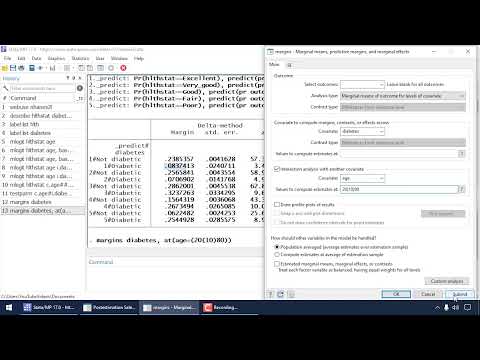
You might want to check out things like `margins` after running the regression. This command helps calculate predicted probabilities based on your model. You can see how likely someone is to choose each option based on their characteristics!
One time I was stuck trying to figure out why my model wasn’t fitting well with some survey data on food choices. After some head-scratching and revisiting my predictors, I realized some key variables were missing. Adding them not only improved the model but also made my findings much more insightful! It’s funny how those little tweaks can change everything.
So remember: exploring and adjusting models is part of the process. Don’t shy away from experimentation; it’s where the magic happens in research!
In summary: use `mlogit`, understand your variables well, take advantage of post-estimation commands like `margins`, and keep playing around with your setup until it feels just right! Happy analyzing!
Comprehensive Guide to Multinomial Logistic Regression Techniques in Stata for Scientific Research
Sure, let’s break down multinomial logistic regression in Stata. This technique is pretty handy when you want to analyze outcomes that involve more than two categories.
So, think about it like this: if you were trying to predict what type of pet people prefer (like dog, cat, or bird), that’s where this comes into play. You’re not just dealing with yes or no answers but multiple choices.
What is Multinomial Logistic Regression?
Basically, it’s a statistical model used when your dependent variable (that’s the outcome you’re examining) has more than two unordered categories. Like I said before: pet preference, types of food people eat, or even voting behavior.
Why Stata?
Stata is a user-friendly software that makes it a lot easier to run complex analyses without sifting through piles of code. It’s popular among researchers and is pretty powerful.
Now, let’s get into some key points about how to actually implement multinomial logistic regression in Stata:
- Data Preparation: Before diving in, make sure your data is clean. This means getting rid of missing values and ensuring that your outcome variable is recorded properly.
- The Command: In Stata, you’ll use the command
mlogitfollowed by your dependent variable and then your independent variables. For example:
mlogit pet_preference age income education. - Understanding Output: After running your model, check out the output. Look for coefficients which tell you how each predictor affects the odds of choosing one category over another.
A positive coefficient means higher odds for that choice! - Pseudo R-squared: This value shows how well your model explains the data – it’s not as straightforward as regular R-squared in linear regression but gives an idea of fit.
- Marginal Effects: It can be super helpful to compute marginal effects using the command
margins. This tells you how changes in your independent variables affect the probabilities of each outcome.
Let me tell you a quick story here! A friend of mine was working on his thesis about what drives college students’ choice of majors. Using multinomial logistic regression in Stata really opened up his analysis! He could see not just whether income mattered but also how age and background influenced those decisions. It was a game-changer for him!
The Wrap-Up:
So yeah, multinomial logistic regression sounds complex at first glance, but once you’re familiar with Stata’s commands and outputs, it becomes way more manageable! Just remember to prep your data well and interpret those outputs carefully—it’ll all start to click into place!
And there you have it! If you keep these points in mind while working with Stata for multinomial logistic regression, you’re gonna do just fine!
Mastering Multinomial Logistic Regression in R: A Comprehensive Guide for Scientific Research
Multinomial logistic regression is like a supercharged version of regular logistic regression. It helps when you want to predict outcomes that can fall into three or more categories. Imagine you’re trying to figure out what type of fruit someone prefers—apples, oranges, or bananas. This method lets you analyze the probabilities of each choice based on different predictors, like age or dietary habits.
In R, getting into multinomial logistic regression is pretty straightforward once you know the basics. Here’s how it goes down:
Get Started with Libraries
First things first, you’ll need some packages. You can use the `nnet` package for this analysis. If you don’t have it yet, just run this command in your R console:
“`R
install.packages(“nnet”)
“`
Then load it up:
“`R
library(nnet)
“`
Understanding Your Data
Before crunching numbers, check out your data structure. You want to make sure your outcome variable is a factor with more than two levels. <- factor(data$fruit, levels = c(“apple”, “orange”, “banana”))
“`
Here’s where things get interesting: make sure your predictors are ready too. They could be continuous (like age) or categorical (like gender).
Fitting the Model
Now comes the fun bit—actually fitting your model! The basic syntax looks something like this:
“`R
model <- multinom(fruit ~ age + gender, data = data)
“`
This command will give you a model predicting fruit preference based on age and gender.
Interpreting Coefficients
Once you’ve got your model fitted, checking out the coefficients is key. Run:
“`R
summary(model)
“`
The output gives you log-odds for each category compared to a reference category (which R picks automatically). Each coefficient tells you how much those predictors affect the odds of choosing one category over another.
For example, if age has a positive coefficient for oranges compared to apples, older folks may prefer oranges over apples.
Making Predictions
Want to see how well your model performs? Use it to make predictions! The function `predict()` can help with that:
“`R
predictions <- predict(model, newdata = data)
“`
This gives you predicted fruit types based on new input data.
Model Evaluation
Evaluating how well your model does is super important! You can use confusion matrices and accuracy metrics for that:
“`R
table(predictions, data$fruit)
“`
From here, calculate accuracy by comparing predictions against actual values!
Anecdote Time!
I remember my stats class where we were asked what factors influenced our snack choices during movie nights. Some classmates swore they only picked popcorn over candy depending on their mood or if they were crushing hard on someone in the room. That feeling—capturing choices based not just on preference but also context—is exactly what multinomial logistic regression lets us explore!
To summarize all this:
- Use libraries: Get comfortable with `nnet`.
- Select and structure data: Make sure your outcome variable is a factor.
- Create a model: Fit it with predictors using multinom().
- Examine coefficients: Check out log-odds comparisons.
- Create predictions: Use predict() for new scenarios.
- Evalueate results: Confusion matrices help clarify accuracy.
So there ya go! Multinomial logistic regression in R isn’t too scary once you break it down into manageable parts. Just take it step by step—soon enough you’ll be mastering those outputs like a pro!
So, multinomial logistic regression—that’s a mouthful, right? It sounds super technical, but don’t worry. We’ll break it down together. Basically, it’s a statistical method used when your outcome variable is categorical and has more than two levels. Think about it this way—let’s say you want to predict what kind of pet people prefer: dogs, cats, birds, or maybe something more exotic like reptiles. Each of these choices is a category in your outcome variable.
Now, if you’re using Stata—a powerful software for data analysis—you can easily perform this kind of regression to see which factors influence pet choice. Maybe you’d find that younger folks are more likely to go for dogs while older folks lean towards cats or maybe it’s all about lifestyle!
Not too long ago, I was working on a research project where we looked at people’s voting preferences in an election. The candidates were from different parties—think of them as those different kinds of pets I mentioned earlier. We wanted to figure out how factors like age, income level, or education might affect who people would vote for. The multinomial logistic regression helped us analyze that without oversimplifying anything.
One thing that really struck me during this process was how essential it is to interpret the results correctly. You know? Just throwing numbers around without understanding them can lead you down the wrong path. It’s not just about crunching data; it’s also about telling a story—making sense of those numbers in the context of human behavior.
Using Stata for this was such a game-changer! It handles complex calculations and outputs results that are pretty easy to read and interpret once you get familiar with it. But honestly? There were moments when my head spun around those coefficients and odds ratios! I mean, sometimes it’s hard not to feel overwhelmed by all the stats lingo flying around.
In the end though, utilizing techniques like multinomial logistic regression not only strengthens our research but also helps us understand our world a bit better. Every dataset tells a story; we just have to learn how to listen! And who knows? Maybe next time you’re choosing your next pet or candidate at the polls, you’ll think about all those underlying patterns guiding your choice—thanks to good old statistical technique!