So, picture this: You’re at a party, right? The music’s pumping, and someone starts talking about statistics. Yikes! Suddenly, everyone’s reaching for their drinks. But wait! What if I told you that understanding Z tests could actually make you the most interesting person in the room?
I mean, imagine confidently explaining how you can figure out if your new pizza recipe is truly better than your friend’s just by crunching some numbers. That’s what a Z test does! It helps you make sense of data and draw conclusions.
You’ve probably heard about R too. It’s like the superhero of data analysis—saving us from boring spreadsheets and making stats fun again. Seriously, it’s powerful and super handy for scientific research.
So, let’s dig into the exciting world of Z tests in R! Together, we’ll break down what they are, why they matter, and how to conduct them without breaking a sweat (or losing your mind). Sound good? Great!
Mastering the Two Sample Z-Test in R: A Comprehensive Guide for Scientific Research
You know, when it comes to comparing two groups in research, the two-sample Z-test is pretty essential. It’s like a tool in your scientific toolbox that helps you figure out if the means of those two groups are significantly different from each other. If you’re using R, a statistical programming language that many researchers swear by, doing this test can be quite straightforward once you get the hang of it.
So, first things first—what does the Z-test actually do? Well, it checks if there are any notable differences between two population means based on sample data. Imagine you’re looking at two different types of fertilizers to see which one helps plants grow taller. You’d want to know if one fertilizer is statistically better than the other. And that’s where our friend the Z-test comes into play!
Now let’s talk about how to actually perform this test in R. You’ll need some specific conditions met before jumping in:
- Sufficient sample size: Generally, your samples should be large (n ≥ 30) for the Z-test to work properly.
- Normal distribution: Your data should ideally be normally distributed. If it’s not, maybe consider a non-parametric test instead.
- Known variances: You need to know the population variances; otherwise, switch gears and look at a t-test.
Let’s say you’ve got two groups of plants: Group A with fertilizer X and Group B with fertilizer Y. You gather height measurements for both groups and now you’re ready to see if their average heights are different. <- c(21, 22, 20, 23, 21) # Heights for group A
group_b <- c(24, 25, 23, 26, 24) # Heights for group B
# Mean and standard deviation for both groups
mean_a <- mean(group_a)
mean_b <- mean(group_b)
sd_a <- sd(group_a)
sd_b <- sd(group_b)
# Sample sizes
n_a <- length(group_a)
n_b <- length(group_b)
# Z statistic calculation
z_score <- (mean_a – mean_b) / sqrt((sd_a^2/n_a) + (sd_b^2/n_b))
# Output the z-score
z_score
“`
As you plug in values into this script and run it, you’ll get a z-score back! This score tells you how far apart your sample means are from each other relative to their variations.
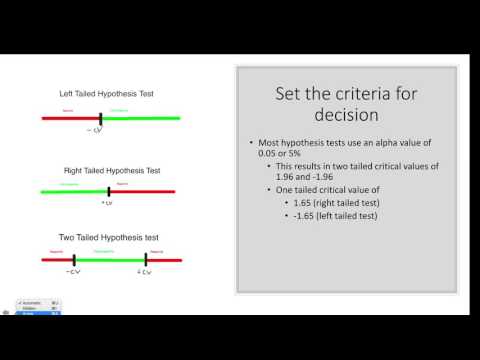
Now comes the next important part: deciding if that z-score indicates a significant difference between your two groups. Typically, you’d compare this z-score against a critical value from the Z-distribution table based on your alpha level (commonly set at 0.05). If your calculated z-score exceeds the critical value… voilà! There’s a statistically significant difference.
Also remember about p-values; they’re like little sidekicks to your z-scores! A small p-value (below your alpha level) reinforces that significant difference claim.
But here’s where things can get tricky: interpreting results isn’t just about numbers! It’s also about understanding context. Let’s say fertilizer X gave an average height increase of just one inch more than Y—sure it might sound tiny but could be significant depending on what you’re measuring!
In essence, mastering the two-sample Z-test isn’t just about running numbers in R—it’s about grasping what those numbers mean for your research or experiments too! It’s exhilarating when you realize you’ve uncovered something new; kind of like finding an extra slice of pizza when you thought you were done eating!
So there you have it—a basic rundown of how to conduct a two-sample Z-test in R while keeping things understandable and lighthearted! Happy researching!
Conducting a One Sample Z-Test in R: A Comprehensive Guide for Scientific Analysis
So, you’re curious about conducting a one-sample Z-test in R, huh? That’s cool. This test is super handy when you want to see if the mean of your sample is significantly different from a known population mean. Let’s break it down together.
What’s a One-Sample Z-Test?
Basically, it allows you to compare your sample mean against a known value. Imagine you have the average height of adult men in your city and want to check if the average height of men in your gym is different from that. Easy peasy!
When to Use It?
You use a one-sample Z-test when:
- Your data is normally distributed.
- You know the population standard deviation (σ).
- Your sample size is large (typically n > 30).
Alright, now let’s get into the juicy part—how to actually run this test in R.
Step 1: Get Your Data Ready
First, you need your data. You can either have it as a vector or import it from a file. <- c(175, 178, 170, 169, 182)
“`
Here we’ve got some heights in centimeters.
Step 2: Set Your Known Population Mean
Next up is defining what you’re comparing against—in our case, let’s say the population mean height of adult men is 175 cm:
“`R
population_mean <- 175
“`
Step 3: Calculate the Sample Mean and Standard Deviation
Now you need to plug into some basic calculations:
“`R
sample_mean <- mean(heights)
sample_sd <- sd(heights)
n <- length(heights)
“`
This code gives you the sample mean and standard deviation pretty easily.
Step 4: Conducting the Z-Test
For calculating z-score manually:
“`R
z_score <- (sample_mean – population_mean) / (sample_sd / sqrt(n))
“`
That’s your z-score right there! But if you’re thinking “Hey, why not use built-in functions?”, I totally get that! R has its packages too.
Z-Test Function in R
You can use a package like `BSDA` for an easier route. First, install it if you haven’t already:
“`R
install.packages(“BSDA”)
library(BSDA)
“`
Then run:
“`R
z.test(x = heights, mu = population_mean)
“`
This little command will return not just the z-score but also the p-value which helps you decide if your null hypothesis holds up!
Step 5: Interpreting Results
If your p-value is less than your alpha level (usually set at 0.05), then voila! You reject the null hypothesis and conclude that there is a significant difference between your sample mean and the population mean.
Just remember—this test has its limitations! Like for small samples or when you don’t know σ; that’s when other tests like t-tests come into play.
So there ya go! You’re all set for conducting a one-sample Z-test in R. Whether it’s for research or just personal curiosity, it’s quite straightforward once you get hands-on with it. Now go ahead and crunch those numbers!
Understanding the Z-Test in R: A Comprehensive Example for Scientific Data Analysis
Understanding the Z-Test is a key element in statistical analysis, especially when you’re diving into scientific data. It’s all about figuring out if there’s a significant difference between the means of two groups. The Z-Test helps you decide whether any observed differences are real or just due to random chance.
So, let’s break it down step by step and talk about how you can actually conduct a Z-Test in R. This might sound complex, but hang with me!
First up, what’s a Z-Test? Essentially, it’s used when you have a large sample size—usually over 30—and you know the population variance. It compares your sample mean to a known value (like the population mean) or to another sample mean. You use it to check hypotheses about data sets.
When you’re working in R, you’ll have to make sure you’ve got your data all set. You’ll typically start by loading your data into R. Maybe you’ve got some numbers from an experiment, say measuring plant growth under two different light conditions.
Now, let’s say we want to test if those plants under light A grew taller than those under light B. To do this in R, you’ll need some basic commands and steps:
1. Use the t.test() function for t-tests, but for Z-Tests specifically we can utilize basic calculations since it’s not directly available as a base function.
2. Calculate the sample mean and standard deviation using mean() and sd().
3. Compute your test statistic with the formula:
Z = (X̄ – μ) / (σ/√n)
Here X̄ is your sample mean, μ is the population mean you’re comparing against (or another sample mean), σ is the standard deviation of the population or sample, and n is your sample size.
4. After that, determine your critical z-value using qnorm(). This lets you find out what’s significant based on your alpha level (commonly set at 0.05).
5. Finally, compare your calculated z-value with the critical z-value from these tables.
See? Not too bad! <- c(15, 16, 14, 18, 20)
light_b <- c(12, 13, 11, 14)
# Calculate means and SD
mean_a <- mean(light_a)
mean_b <- mean(light_b)
sd_a <- sd(light_a)
sd_b <- sd(light_b)
# Assuming population standard deviation is known
sigma <- sd(sd_a + sd_b) # Just for illustration; adjust as needed
# Sample size
n_a <- length(light_a)
n_b <- length(light_b)
# Conducting Z-test
z_value <- (mean_a – mean_b) / (sigma / sqrt(n_a + n_b))
# Print results
print(z_value)
“`
This snippet calculates everything you need and gives you an idea of how far off those means are from each other—expressed in standard deviations.
In practice though? Make sure you’re comfortable interpreting these numbers! If your calculated z-value exceeds critical values from z-tables based on your alpha risk level? That usually indicates significant results—you’ve got something interesting happening!
Remember too that understanding what you’re looking at goes beyond simply running tests—it involves grappling with uncertainty in real-world contexts and making sense of variability in data.
Research can be messy but that’s part of its charm! So getting familiar with tools like R for statistical tests opens up worlds of inquiry for scientific research—and who knows what cool discoveries await on the other side?
So, let’s chat about something that might seem a bit technical but is actually pretty cool: conducting Z tests in R for scientific research. Alright, hear me out—Z tests are just one of those nifty statistical tools we use to figure out if there’s a significant difference between groups. Think of it as your friendly neighborhood referee in the world of data.
I remember sitting in a statistics class once, feeling completely lost when my professor started explaining Z tests. I felt like I had stepped into a different universe where numbers danced around and words like “hypothesis” and “significance” floated around like confetti. But later on, during a research project, it all clicked! When you’re trying to decide if two groups are really different—like men vs women on a specific test score—it becomes super handy.
So what’s the deal with R? It’s this open-source software that makes analyzing data way easier than you’d think. It’s got all these packages and functions that help you run Z tests without too much fuss. Basically, you input your data and tell R what you want to do—like comparing means between two sets of scores—and boom! You get results that can either support or reject your hypothesis.
Now, let’s break it down a bit more. A Z test helps when you have a large sample size (usually over 30). This is because it assumes that the sampling distribution of the mean is normal which gets more accurate with larger samples. You simply calculate your Z score based on the difference between your sample mean and the population mean divided by the standard deviation, or standard error if you’re working with sample data.
It might sound complex now but trust me—it simplifies things immensely when you’re sifting through mountains of research data. Oh! And let’s not forget about p-values; they’re kind of like your compass guiding you through the statistical jungle. A p-value less than 0.05 often means you’ve found something noteworthy—something worth exploring further.
But remember: it’s not just about crunching numbers and getting answers. There’s this human side to research too! You need to think critically about what those numbers really mean in context. The joy of finding significant differences can also bring up new questions! What does it mean for society? What steps should we take next?
In essence, conducting Z tests in R shapes how researchers explore relationships within their data—and it’s not just for scientists locked away in labs; anyone curious enough can dive into this world too! So next time you’re looking at some data or results from an experiment, just remember there are powerful tools out there helping unravel stories hidden within those numbers. How cool is that?